
In this post I’ll go over how and why to link your Shades of Green reservation number and your Walt Disney World Military Tickets into Walt Disney World’s My Disney Experience system.
The Shades of Green Resort is an Armed Forces Recreation Center located right on Walt Disney World property!
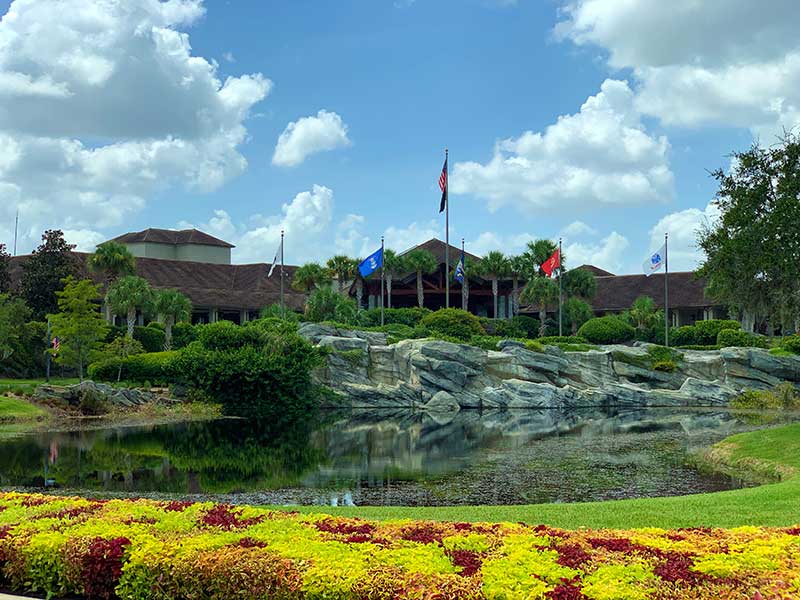
Shades of Green is a military owned and operated Armed Forces Recreation Center just like the ones that you may be familiar with overseas, but located on Disney World property. Although it is right on Walt Disney World Property, it is not a “Disney” hotel.
Shades of Green has a separate reservation system that is not linked to Disney’s, but being on property there are some of benefits Disney affords to their geusts that are extended to Shades of Green Guests as well.
Why to Link Your Military Tickets and Shades of Green Reservation
Walt Disney World uses your My Disney Experience account (accessible via the Disney World website or the My Disney Experience app) to allow you to control many aspects of your vacation.
Dining

The reason to link your Shades of Green Resort Room Reservation into the Disney system is to open up the extended dining reservation window.
Walt Disney World Dining Reservations can currently be secured 60 days in advance (prior to the 2020 shutdown it was 180 days, and everyone is hoping that comes back!). Those without a Walt Disney World Resort Reservation have to make their dining reservations day-by-day 60 days prior to the desired date.
Disney guests can make reservations for their whole trip (up to the first 10 days if it is a long trip) 60 days prior to the check in date. Disney also extends this benefit to Shades of Green guests. In order to unlock this benefit you need to let Disney’s system know about your Shades of Green reservation.
Theme Park Reservations

Upon reopening after the shutdown, Disney began using a theme park reservation system. In order to tour Disney’s theme parks you naturally need a ticket and now you also need a reservation. This allows Disney to cap attendance in each park to a level they desire. Everyone also can’t wait for this to end!!! This has nothing to do with “safety”, it has to do with Disney’s inability to reach needed staffing levels.
You’ll need to make a theme park reservation for the first (or only) park that you would like to enter on each day of your vacation preferably well ahead of time. Park Hopping is still allowed, but has several new restrictions due to the capacity limits.
In order to make a Theme Park Reservation, you need to link your ticket(s) to your My Disney Experience account.
Note: Prior to the closure you had to link your tickets in order to make FastPass+ reservations 30 or 60 days prior to your vacation. Disney changed this system into the paid, day of reservation system Disney Genie+.
My Disney Experience
If you don’t have one, you’ll need to sign up for a free disney.go.com account to access My Disney Experience. Just go to disneyworld.disney.go.com/plan and click on create account. Then enter your email, create a password, and enter demographic info.
If you already have an account at disney.go.com (on any of the sub-sites: disneyworld.com, disneyland.com, disneyplus.com, etc.) you are all set, just click on Sign In.
As with most things on the computer, there are several ways to get your group added and link room reservations and tickets. You can really do it in any order and once your party members are added to My Disney Experience, they will always be there, making subsequent linkings easier!
For a first-timer I find that it is easier to enter your Family and Friends that will be in your party first.
To do so:
On the app click on the menu icon in the bottom right. Some call this the “Hamburger” button.
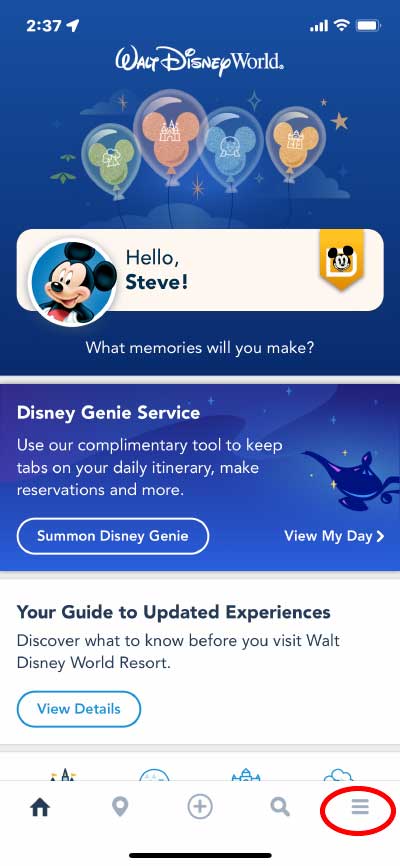
My Disney Experience App Main Screen
Then on the menu page scroll down till you see My Profile and click it.
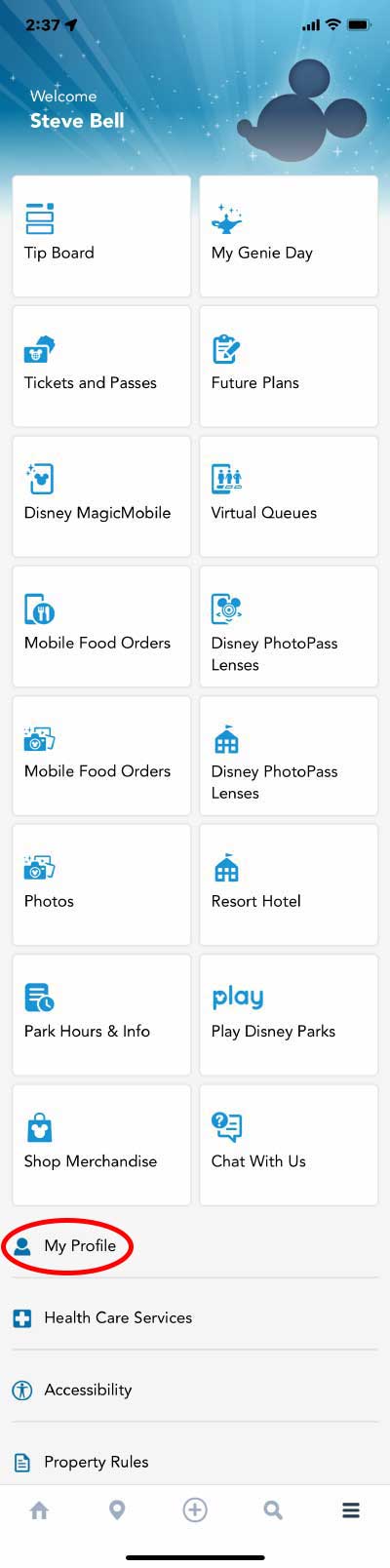
My Disney Experience App Menu Page
At the top of your profile click Family & Friends List. There you can click on the Plus Sign to add a new guest then there are several options as to how. Just click I’ll enter their name and age, then do so for each person.
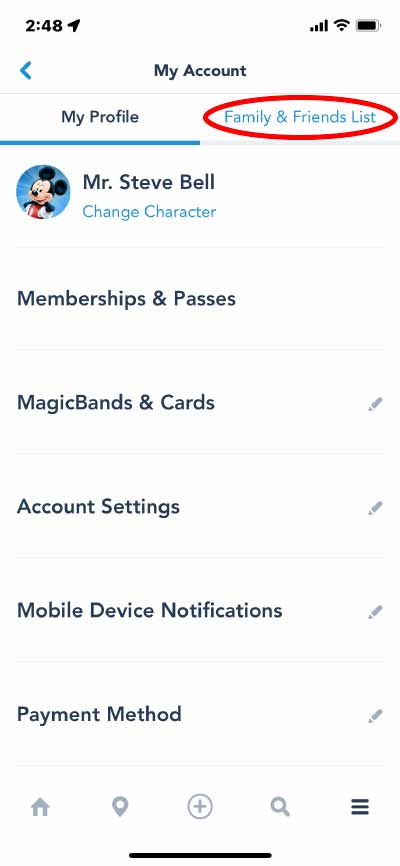
My Disney Experience App Friends and Family
On the Website hover over My Disney Experience and then click on My Family & Friends.
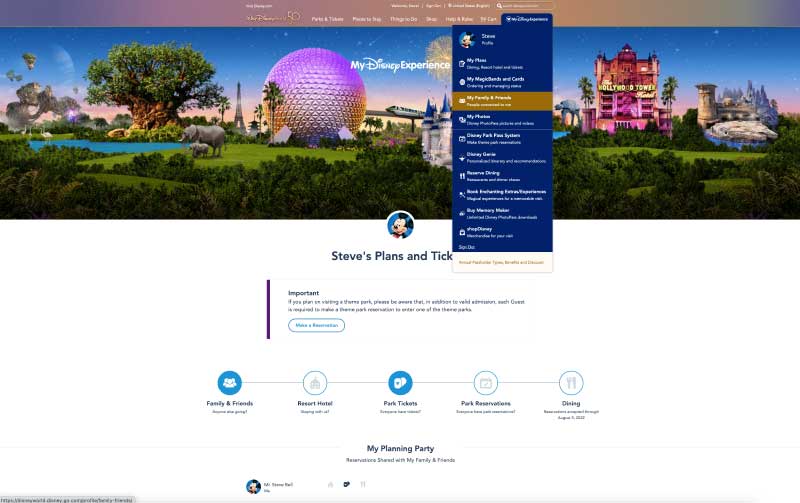
My-Disney-Experience-Main-Page
On the next page you can click on the Plus Sign to add a new guest then there are several options as to how (2 of which are different from the app). Just click I’ll enter their name and age, then do so for each person.
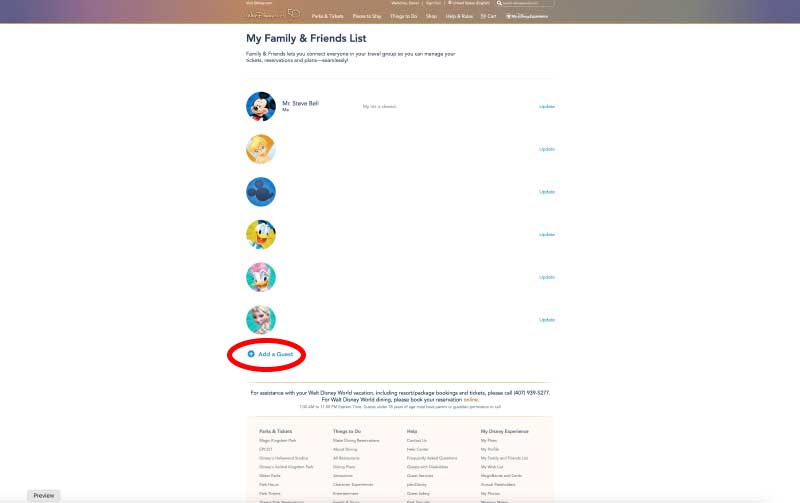
My Disney Experience Friends and Family
Now that you have your people added you can move on to linking your reservation and tickets.
How to Link Your Shades of Green Reservation
Here’s how to link your Shades of Green reservations to your My Disney Experience account.
When you make a room reservation at Shades of Green, they will give you reservation number (typically 13 digits of numbers and letters). You’ll use this to link your reservation.
First you should know that it takes time for the Shades of Green reservation system to talk to Disney’s. Disney says it could take up to 24 hours for your Shades reservation to be linkable. I’ve found that it takes even longer!
If you try to link before the reservation shows up in Disney’s system you’ll just receive an error message telling you it could take up to 24 hours. Just wait and try back later.
You’ll need to do this on your computer or phone’s browser. Do not use the My Disney Experience app.
To link your reservation you’ll go to the My Disney Experience main page.
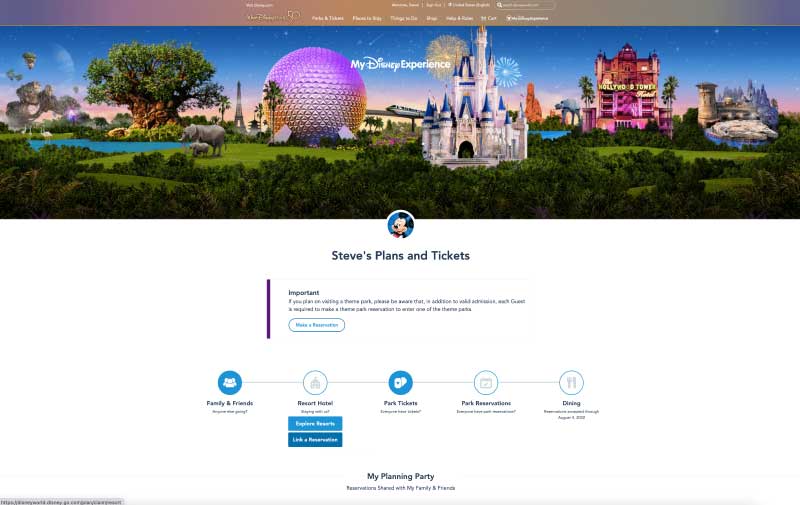
Once there, hover your mouse over Resort Hotel and then click, Link a Reservation. You will then be taken to a page where you will enter your Shades of Green reservation number and and the last name of the sponsor as it is on the Shades of Green reservation.
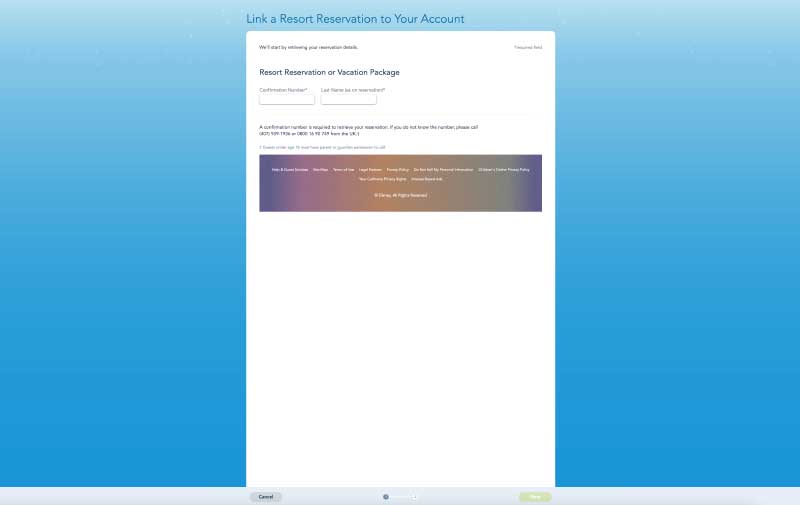
Then at the bottom of the screen click, the green Next button. It is easy to miss.
When your reservation is found you’ll then be asked to update the names of the people in your party.
When making your reservation, Shades of Green only asks for the name of the person who is the eligible sponsor making the reservation and the number of other guests. They don’t ask for any of the other names in the party as Disney does so you’ll need to enter them here. There will be spaces for the number of people that you told Shades of Green will be in the room.
The sponsor’s name will show up first in the list along with a drop down to the right containing all of the names in your Family and Friends list. Select your name from the list. If your full first name (on your credit card and Shades reservation) is different than the name you go by (“Names do not match”)(i.e.Stephen vs Steve) you’ll be asked to verify it’s the same person.
Then because Shades did not get the rest of the names each additional person will show up in the list as “SOG_GUEST_FIRST_NAME, SOG_GUEST_LAST_NAME” again select from the dropdown one of your party. You will get the names don’t match error again. When finished click on Done. That’s it.
Note: If the name you need in not in the dropdown you can add it. At the bottom of the dropdown you’ll click on the plus symbol with Add to Family and Friends.
Sponsored Rooms
Military members or spouses may Sponsor Rooms for those not eligible to stay at Shades of Green on their own (for example family and friends for a joint vacation).
Since Shades of Green only collects the sponsors name, number of adults and number of children when you link a sponsored reservation you see the sponsor’s name and the generic SOG names.
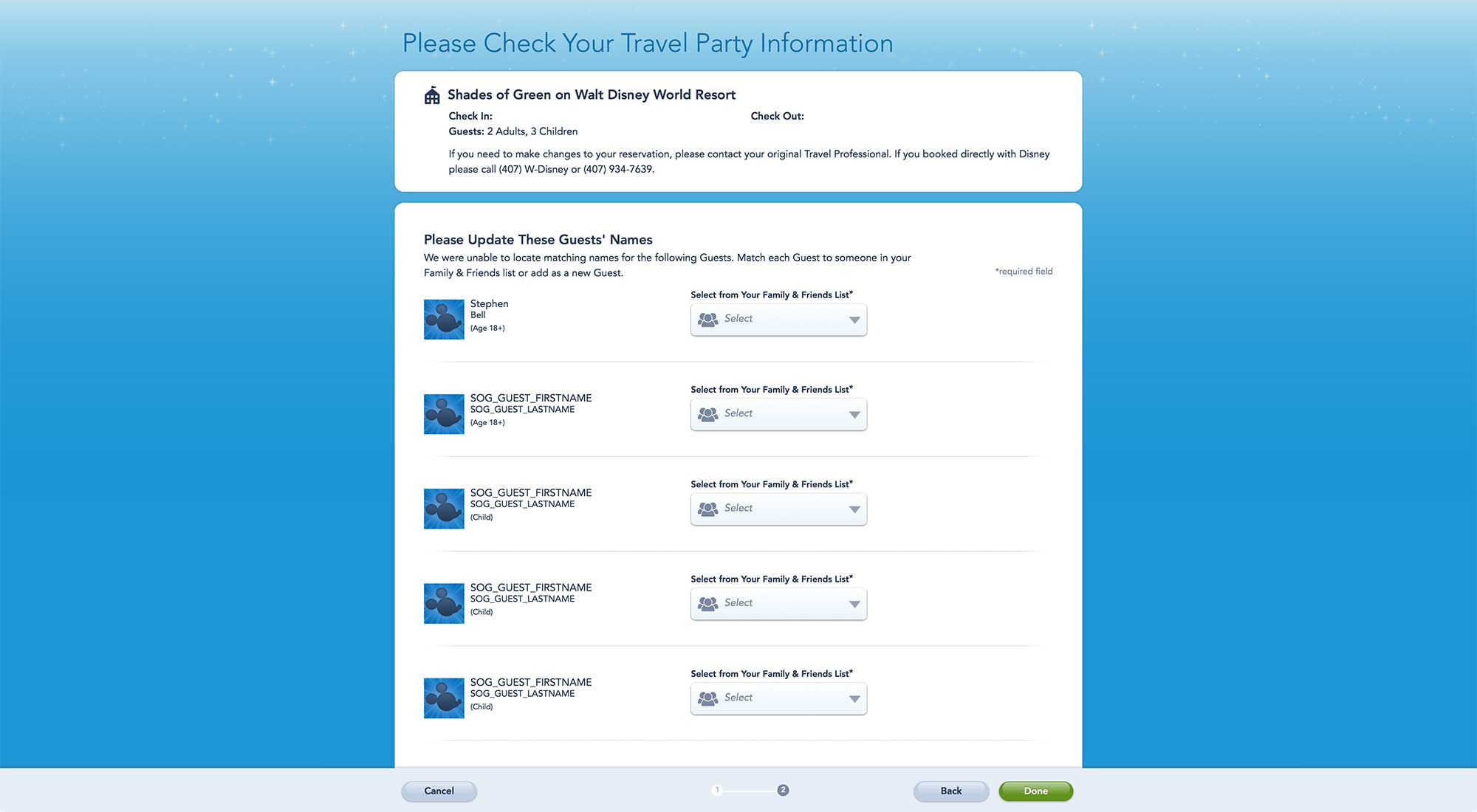
Shades of Green Sponsored Room – Click for larger version
In this instance you’ll select the main person in the sponsored room rather than yourself and have to confirm that is what you want. Then proceed as above adding each person in that room.
How to Link Your Military Tickets
You can link your military tickets using either the My Disney Experience app or the My Disney Experience portion of the Disney World website.
In this post I’m going to cover how to do it with your app as it is much easier!
If you’d like to learn how to do it on the website, please take a look at my detailed main Linking Military Tickets Post.
Linking Directions
As I said, the easiest way to link tickets is using your My Disney Experience smart phone app. Just scan the tickets!
To link your tickets click on the menu icon in the bottom right.
My Disney Experience App Main Screen
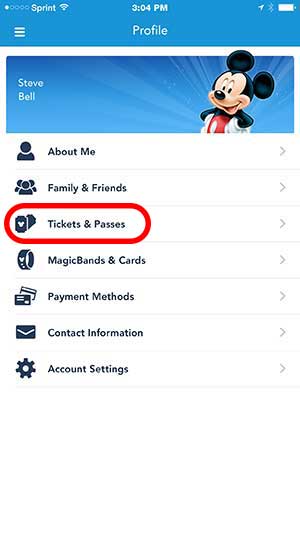
Then on the Menu Page click on Tickets and Passes.
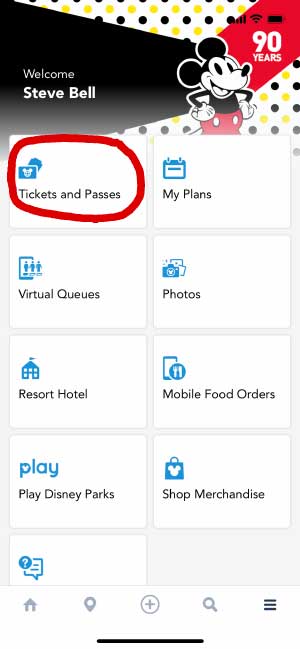
If you have any linked ticket they will show here as mine does. Click on the Plus Sign.
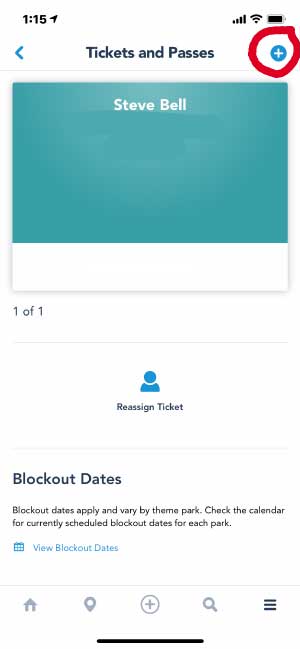
Two options will drop down. Click on Link Tickets & Passes
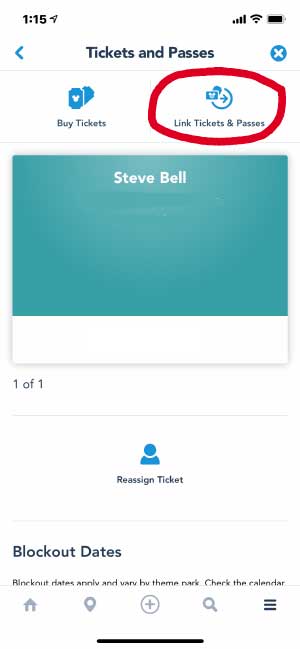
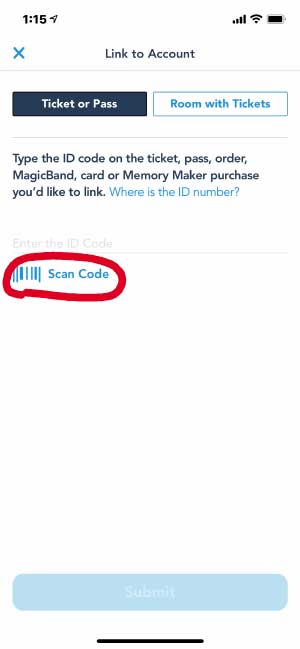
Ticket or pass should be highlighted. Click on Scan Code
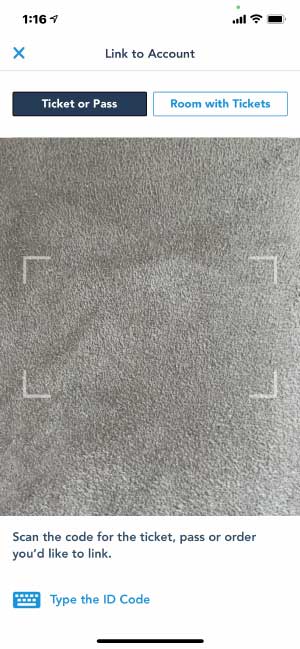
Then scan the back of your ticket (you must allow My Disney Experience access to your camera in your phone settings).
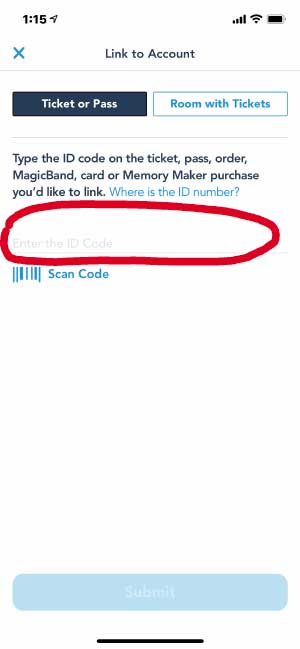
Or you can manually enter the long number from the back of the ticket.
You will then be asked to assign the ticket to one of the Friends and Family in your account. Associate each ticket with a person in your party.
Walt Disney World Ticket Info

A Disney Armed Forces Salute Plastic Ticket Voucher
When ordering your tickets whether from a Base Ticket Office, or long distance from Shades of Green or another Base that ships allow plenty of time for them to order the tickets. Some Bases don’t stock them and often tell you that it will take up to 2 weeks to get them and for the tickets to be shipped to you.
When purchasing Disney World tickets from a Base ticket office they could come in 1 of 3 different types.
- Hard plastic credit card like tickets
- Thick card stock ticket sized “Exchange Certificates”
- A regular sheet of 8″x11″ printer paper “Exchange Certificate” with a list of your ticket numbers on it
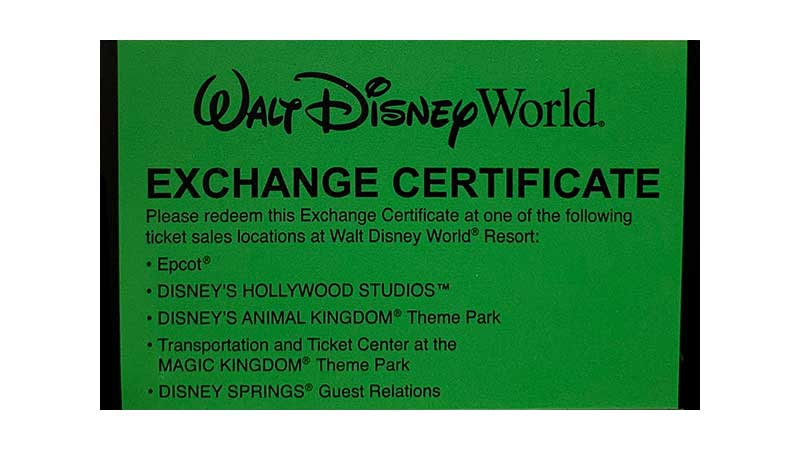
A Disney Armed Forces Salute Cardboard Exchange Voucher Ticket
Each Base Ticket Office uses a different types depending on the ticket type you purchase. Personally, I’ve ever received #3. All that matters, no matter the type though is the ticket number!
When linking, take the individual tickets/vouchers or sheet of paper and designate a ticket/ticket number for each person in your party. Go ahead and write their name on the back of the ticket/voucher or next to their name on the paper. Note, some Bases go ahead and do this for you ahead of time. It’s not required, but helps to tell them apart later.
Take a pic with your phone (or camera) of each ticket with the name on it or the sheet of paper with names. Also take a pic of your original ticket sales receipt. These pics will come in very handy if a ticket is lost. See our post on ticket security.
Helpful Ticket Links
- Disney’s Armed Forces Salute Ticket Info
- Regular Military Discounted Magic Your Way Tickets
- What’s the Right Ticket?
What about Magic bands?
Shades of Green guests can use Magic Bands, for their theme park tickets and Genie+ passes, the bands just won’t do all the things associated with the hotel, like open your room door.
If you’d care to purchase them from the Disney Store ahead of time. I always use my Magic Bands from a previous Disney Resort stay when staying at Shades of Green.
Once you have them in hand you will then link each band to a person in your party. On the My Disney Experience Menu you’ll click on Magic Bands and Cards. At the bottom of the page click on the Link Button and follow the instructions.
Once a band is linked to a person, any tickets or passes that you link or have linked to that person will automatically link to the band.
See my Magic Bands for Shades of Green Guests post.
Wrap Up
That’s it for this post. Please feel free to ask any questions in the comment section below.
This article was written by Steve Bell, founder of Military Disney Tips.
Steve is a retired U.S. military member who has been visiting the Disney Parks since 1971 and writing about Disney military discounts and vacations for the military community for over 18 years.
Read Steve’s Full Bio | Follow Military Disney Tips on Facebook
Leave a Reply