
With Walt Disney World’s Theme Park Reservation system, the pre-purchase of Disney Military Discounted Tickets has become even more essential.
In order to make your Theme Park Reservations ahead of time you need to link the temporary tickets (or vouchers) that you purchased from a military reseller (Base Ticket Office) to your My Disney Experience (MDE) account.
Once linked you can then make your Theme Park Reservations for any available date (typically 1 year out).
Getting Your Tickets
The first thing you must do is to buy your tickets and have them in hand prior to the date you want to make your theme park reservations.
There are several ways to do this.
- Buy them from your (or a nearby) Base Ticket Office (allow 2 extra weeks for them to order tickets if necessary)
- Buy your tickets from Shades of Green, Camp Pendleton, or another base via phone/email (allow 2 extra weeks for them to order tickets and a couple days to FedEx)
Paper Vouchers or Tickets
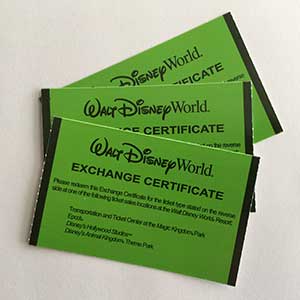
Disney Armed Forces Salute Paper Ticket Vouchers
When buying Disney’s Armed Forces Salute tickets from a Base Ticket Office, including Camp Pendleton you will be given one of 3 different products:
- Plastic Tickets that are non-functional
- Paper Ticket Vouchers that look like the green ones depicted here (they have also been blue)
- An 8.5″ x 11″ Paper Voucher
In all cases these are what Disney calls Exchange Vouchers. They are called Exchange Vouchers because they must be exchanged once you arrive at WDW for your actual tickets during the Activation Process. Note if you have Magic Bands you may not be given physical tickets during the activation process (unless you ask for them).
Shades of Green sells their tickets pre-activated. If you purchased from Shades this activation procedure is not required!
Note: Regular Military Discounted Disney Tickets do not normally need to be exchanged upon arrival.
Both types of the paper ticket vouchers and non-functional tickets can be linked to your MDE account! Once linked you may make your park reservations.
You can link your vouchers/tickets by typing the individual number printed on each into the MDE website or by scanning the barcode with your MDE Smart Phone App, scanning the vouchers is easiest!
Rest assured that your Theme Park Reservations will carry over to your actual park tickets after activation!
Your Theme Park Reservations are made against the names of those in your party, not their ticket numbers. The linking of the tickets merely allows Theme Park Reservations for the number of days on the voucher/ticket. When the actual ticket is linked to the individual their Theme Park Reservations will be usable on the ticket/magic bands/smart phone app linked to their name.
Ticket Linking Directions
Note:
All Salute tickets (vouchers) should link just fine with the directions below.
But if you experience any trouble you can always call the tech support number and they will happily link them for you. Disney Internet Help Desk at 800-848-6413, option #3
First you need to have a My Disney Experience account – Get one here
Link your Disney Resort Reservation if needed, by typing in your conformation number and last name – On the My Disney Experience menu click “My Reservations and Tickets”, then on the next page “Link Resort Reservation.”
Next add the other members of your party if needed, (On the My Disney Experience menu (right side) click “My Family and Friends”). If you’ve linked a resort reservation, everyone on the reservation will already be in your account.
Before You Link Your Tickets – Write the name of each person in your party on a ticket. This will aid in telling them apart, which you will need to do during the activation process.
Linking Directions
Below we have both smartphone app and desktop computer directions.
The easiest way to link tickets is using your My Disney Experience smart phone app. Just scan the tickets!
Smartphone Directions
Or you can use your My Disney Experience Smart Phone App to scan in your tickets!
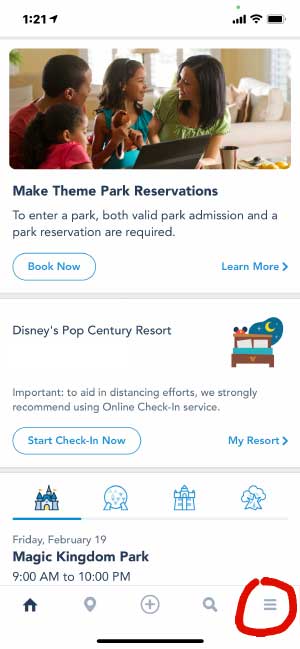
To link your tickets click on the menu icon in the bottom right.
Then click on Tickets and Passes.
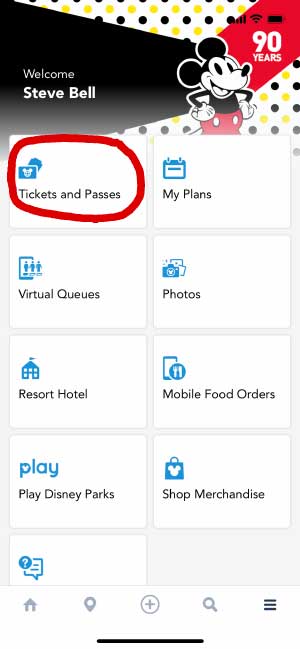
If you have any linked ticket they will show here as mine does. Click on the Plus Sign.
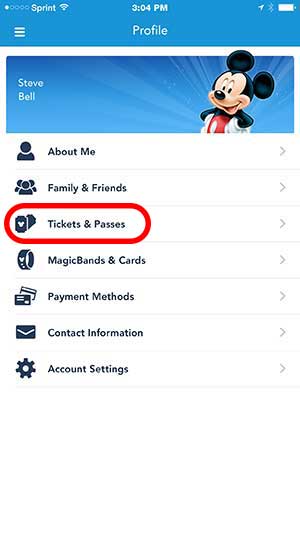
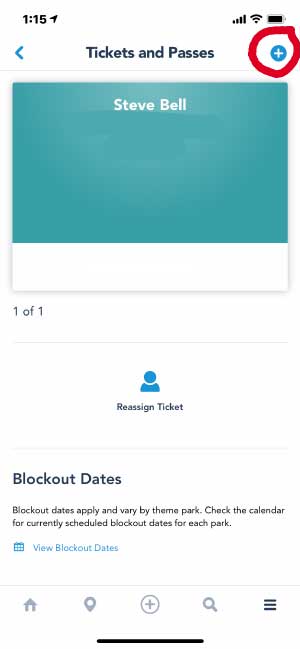
Two options will drop down. Click on Link Tickets & Passes
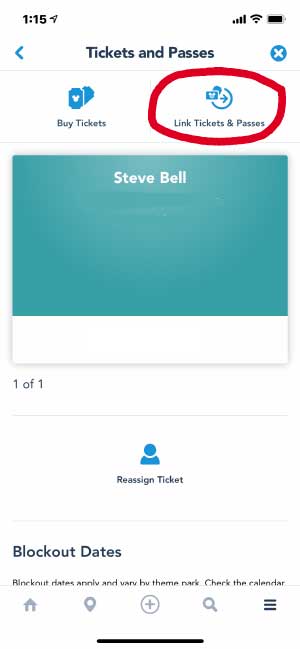
Ticket or pass should be highlighted. Click on Scan Code
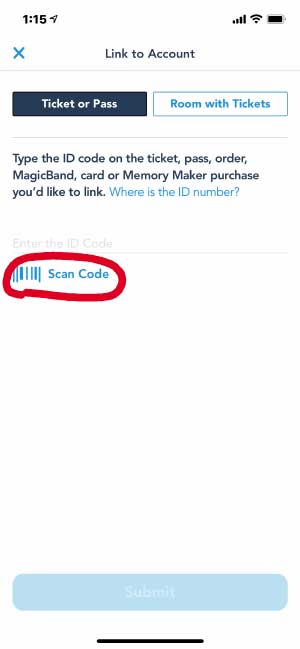
Then scan the back of your ticket (you must allow MDE access to your camera in your phone settings).
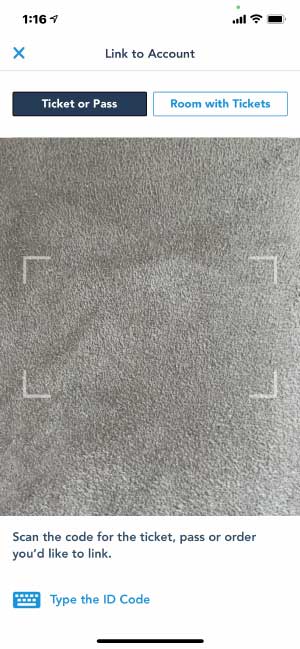
Or you can manually enter the long number from the back of the ticket.
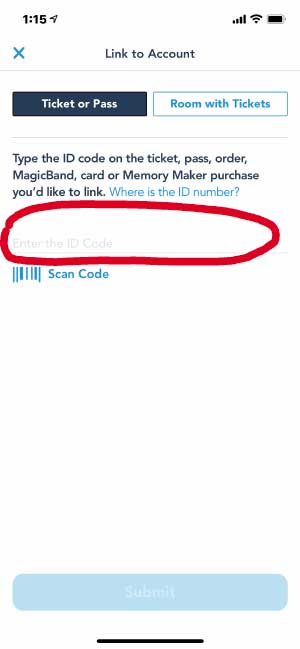
You will then be asked to assign the ticket to one of the people in your party. Associate each ticket with the person whose name you wrote on the ticket.
Desktop Directions
If the tickets won’t scan or you want or need to use your computer follow the directions below.
Note: you can disregard any references to ages 10+ both during linking and while using MDE for these tickets afterwards. Disney Armed Forces Salute tickets have only one type of ticket for ages 3+. Everything will function properly!
Go to the My Disney Experience webpage: disneyworld.disney.go.com/plan/
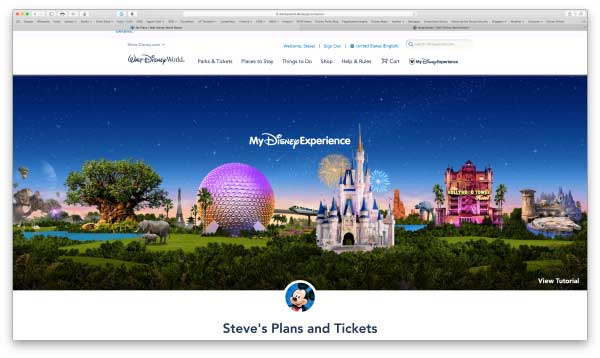
Scroll down to your Plans and Tickets.
Hover over Park Tickets and then click Link Tickets
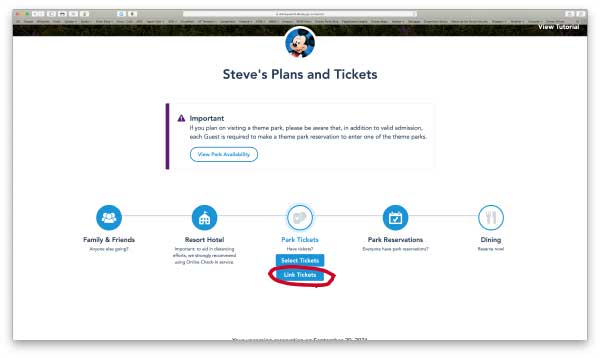
If you have plastic tickets or the paper vouchers, use the page that opens to add your tickets.
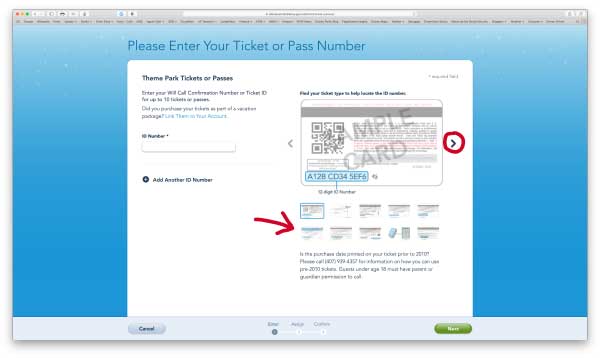
On the right side either click the right or left arrow or under the big picture of the back of a ticket you can click on the “mini tickets” to find the image that looks like the back of your ticket
On the bottom of your ticket or voucher you will see a group of numbers under a bar code.
Enter all of these in the ID Number box.
Be careful with 0 (zero) and Os! They look very similar on Disney’s tickets.
You will then be asked to associate the ticket with a person in your MDE account. Associate each ticket with the person whose name you wrote on the ticket.
If you run into any problems just call Disney’s Internet Help Desk at 800-848-6413, Option #3
DO NOT DISCARD YOUR TICKETS/VOUCHERS!!!
After you have linked your temporary tickets or vouchers Do Not Loose or Discard Them!!!
You will still need to bring these with you for the in person ticket activation process at Disney.
See more on activation below.
My Disney Experience Linking Issues
If you have issues linking your tickets or the number of days on the ticket does not show up in MDE (this can happen with Regular Military Discounted Magic Your Way Tickets) simply call the Disney Internet Help Desk at 800-848-6413, option #3. They can assist you with getting things right.
Linking Notes:
When linking Disney Armed Forces Salute tickets to children you will sometimes get a message that you’ve linked a ticket for ages 10+ to a child. This is not an issue and affects nothing!
Make your Theme Park Reservations
You can begin making your Theme Park Reservations.
To make your reservations, see out post on Using WDW’s Theme Park Reservation System.
Buy Magic Bands (if Desired)
Walt Disney World Resort may purchase Magic Bands with their Disney Resort stay ahead of time at a discount if they would like to use them.
If you’re staying at a non-Disney World resort (such as Shades of Green) and would still like to use Magic Bands here is what to do.
If you have Bands from a previous trip, you don’t need to do a thing. Your old bands will still work!
But if you need to get some you can buy them from the Disney Store online.

Once they arrive you’ll link them to each person in your My Disney Experience account and be ready to roll on arrival. Note: you must also link your tickets to each person.
Magic Bands come in several basic colors and many special designs.
See Magic Bands for Shades of Green Guests
You can also buy Magic Bands after you arrive from most WDW merchandise shops.
Ticket Activation
Upon arrival for your vacation you must still activate your Salute tickets, linking them to My Disney Experience does not accomplish this. Disney still needs to do an ID check to ascertain eligibility (except for tickets sold by Shades of Green).
See this post on how to activate your Disney Armed Forces Salute tickets.
Was this post helpful to you? Do you have other tips to Share?
Let us know in the comment section below!
Frequently Asked Questions
Do I need to link my military tickets in the Disney app?
Yes. Linking enables park entry, park planning, and purchasing Lightning Lane options.
Do I still need theme park reservations?
Some ticket types and dates may require reservations. After linking your tickets, the app will indicate if reservations are needed for your visit dates.
How do I manage Lightning Lane with military tickets?
Lightning Lane is not included. At Walt Disney World, add Lightning Lane Multi Pass or Lightning Lane Single Pass in the app day-by-day. At Disneyland, purchase the in-app option after entering the park.
How To: Link Tickets & Check for Required Reservations
- Open the Disney app. Sign in or create an account.
- Link tickets. Enter the ticket ID/number for each guest.
- Assign tickets. Make sure each ticket is assigned to the correct person.
- Check reservations (if applicable). The app will show whether reservations are needed for your dates and ticket type.
- Plan line-skipping. Add Lightning Lane Multi Pass/Single Pass (WDW) or buy the in-app option at Disneyland after park entry.
This article was written by Steve Bell, founder of Military Disney Tips.
Steve is a retired U.S. military member who has been visiting the Disney Parks since 1971 and writing about Disney military discounts and vacations for the military community for over 18 years.
Read Steve’s Full Bio | Follow Military Disney Tips on Facebook
Planning a Disney Vacation?
Military Disney discounts can save families a significant amount of money, but figuring out eligibility, tickets, resorts, transportation, and Lightning Lane strategies can get confusing quickly. These guides are a great place to start.
- Back to Basics Posts – Start here for beginner-friendly Disney planning topics.
- Disney Veteran & Military Discount Eligibility Guide
- Disney Military Tickets – Your Start-to-Finish Guide
- Disney Armed Forces Salute Guide
- Walt Disney World Vacation Planning Guide
- Disney Packing Checklist
More Planning Resources:
Need Help Planning Your Disney Vacation?
Disney military discounts can save families a lot of money, but figuring out tickets, eligibility, resorts, Lightning Lane strategies, and transportation can quickly become overwhelming.
That’s why Military Disney Tips recommends The Mouse Experts Military Disney Vacation Specialists.
The Mouse Experts is a military-family owned and operated Disney-specializing travel agency that has partnered with Military Disney Tips for over 18 years. Their agents personally use the same military discounts that you do and understand the unique challenges military families face when planning Disney vacations.
- Experienced with Disney military discounts and eligibility rules
- Military-family owned and operated
- Same Disney pricing as booking directly with Disney
- Additional planning assistance available for guests wanting more personalized help
- Can help reduce stress, save time, and avoid common planning mistakes
Over 27,000 Military Disney Tips readers have contacted The Mouse Experts over the years for help planning their Disney vacations.
Thank you! Very helpful.